

FNAF 3
- Developer: Scott Cawthon (Scottgames, LLC)
- Rating: 7.1/10 (Metacritic) | Very Positive (89% Steam Reviews)
- Released: March 2, 2015
- Technology: Clickteam Fusion 2.5
- Platforms: Windows, iOS, Android, Nintendo Switch, PlayStation 4, Xbox One
Game Overview
What Is Five Nights at Freddy's 3?
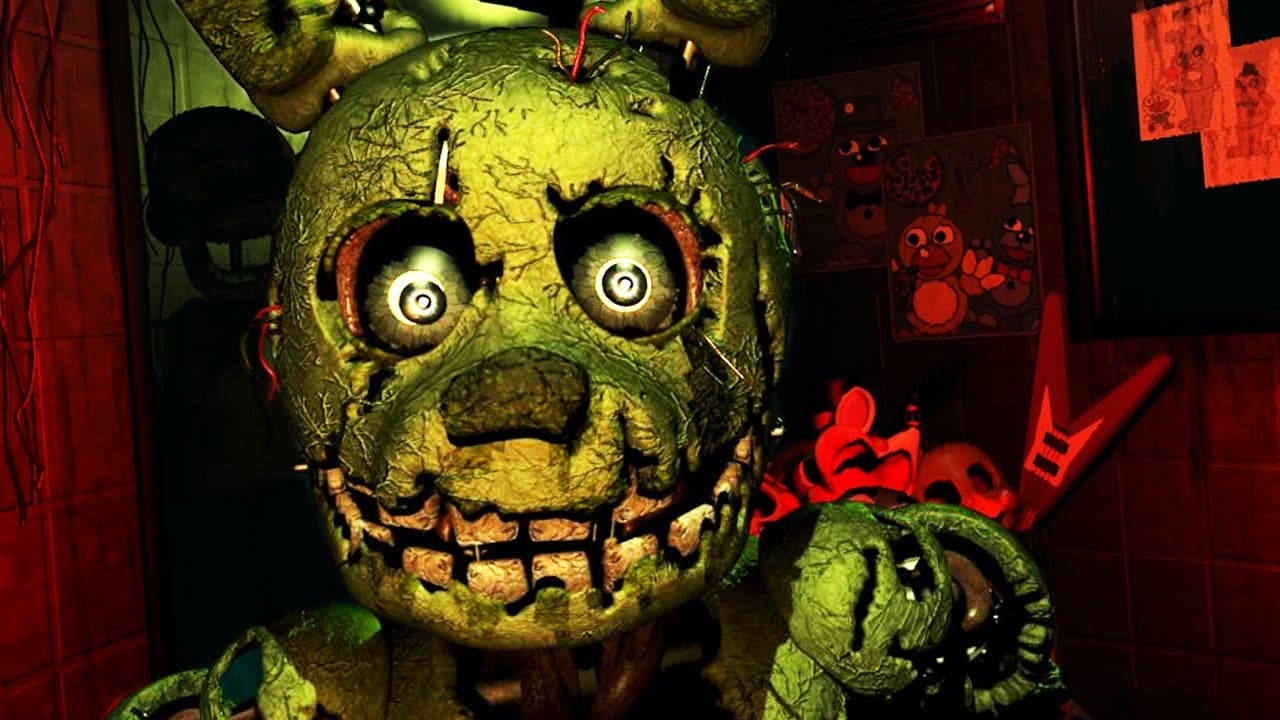
Five Nights at Freddy's 3 is the third installment in Scott Cawthon's legendary survival horror series, taking place thirty years after the original Freddy Fazbear's Pizza closed. Set in "Fazbear's Fright: The Horror Attraction," players must survive against Springtrap, the only animatronic capable of killing, while managing phantom hallucinations and failing electrical systems.
Core Loop
Players monitor security cameras to track Springtrap's movements through the horror attraction while maintaining three critical systems: audio devices, camera network, and ventilation. Unlike previous FNAF games, players use audio lures to manipulate Springtrap's location and must constantly reboot systems that fail due to phantom jumpscares or natural deterioration.
What Makes It so popular now?
FNAF 3 online revolutionizes the series formula by focusing on a single lethal threat—Springtrap—while introducing phantom animatronics that create psychological warfare. The maintenance panel system adds strategic depth, requiring players to balance system management with Springtrap tracking. The game concludes the original FNAF trilogy's storyline with multiple endings based on minigame completion.
How to Play FNAF 3 Online – Exclusive Guide
Beginner Route - Pro Tips
Essential Survival Strategy:
- Locate Springtrap: Always know his position using cameras 1-10
- Audio Lure Management: Use adjacent room audio to guide Springtrap away from office
- Vent Control: Seal vents immediately when hearing movement sounds
- System Priority: Reboot Audio > Camera > Ventilation when multiple failures occur
Springtrap Positioning: Keep Springtrap in cameras 9-10 (furthest from office). These positions provide maximum safety buffer and easier audio lure management.
Controls Guide
- Camera System: Monitor Springtrap's location and phantom activity
- Audio Devices: Click Play Audio button on cameras adjacent to Springtrap
- Vent Sealing: Double-click vent cameras to block Springtrap's passage
- Maintenance Panel: Reboot failed systems (Audio/Camera/Ventilation)
FNAF 3 Springtrap Strategies - Pro Tips
Springtrap Management - Exclusive Guide
Optimal Positioning Strategy: Maintain Springtrap in Camera 9 or 10 using sequential audio lures. If he's in Camera 8, lure to Camera 9. From Camera 9, guide to Camera 10. This creates maximum distance from your office.
Audio Lure Rules:
- Only use audio in rooms adjacent to Springtrap's current location
- Never place audio on Springtrap's current camera (causes advance toward office)
- Audio effectiveness decreases beyond one room distance
- Springtrap requires 2-3 seconds to respond to audio cues
Vent System Mastery
Critical Vent Management: All vents lead directly to your office. When you hear bumping sounds, immediately check vent cameras and seal the occupied one. Springtrap moves quickly through vents—hesitation equals death.
Vent Sealing Priority: Always pre-emptively seal vents closest to Springtrap's location. If he's in Camera 7, seal the adjacent vent immediately.
System Maintenance - Pro Tips
Reboot Priority Order:
- Audio System: Critical for Springtrap control
- Camera System: Essential for tracking and phantom avoidance
- Ventilation: Prevents hallucinations and office blackouts
Multiple System Failures: When 2+ systems fail simultaneously, use "Reboot All" for faster restoration.
Phantom Animatronics Defense
Phantom Avoidance Strategies
Phantom Balloon Boy: Appears randomly on any camera. Switch cameras or exit monitor within 1.5 seconds to avoid jumpscare.
Phantom Freddy: Walks slowly across office hallway. Raise camera or maintenance panel when he approaches hallway's end to prevent ventilation failure.
Phantom Foxy: Appears when moving left in office. Move slowly leftward, exit immediately if spotted, then flip camera up/down to clear him.
Phantom Chica: Only appears on Camera 7. Switch cameras immediately when spotted to avoid ventilation reset.
Phantom Puppet: Random appearance on Camera 8. Cannot be avoided—causes audio and ventilation errors.
Night-by-Night Walkthrough
Night 1-2: Learning Phase
Focus on Springtrap location tracking and basic audio lure mechanics. Phantom activity remains minimal—perfect for mastering fundamentals.
Night 3-4: Difficulty Escalation
Springtrap moves unpredictably with increased phantom interference. Develop consistent system reboot patterns and phantom recognition skills.
Night 5: Maximum Challenge
All systems active simultaneously. Springtrap becomes highly aggressive with frequent phantom jumpscares. Master-level multitasking required.
Nightmare Mode (Night 6)
Springtrap reaches maximum aggression with minimal system stability. Perfect execution of all strategies essential for survival.
Frequently Asked Questions
Q: Can I play FNAF 3 free online? A: Yes, FNAF 3 unblocked versions are available on gaming platforms, though the official version provides the complete experience with achievements.
Q: How do I beat Springtrap when he reaches my door? A: If Springtrap appears at your doorway, try using Camera 1 or 2 audio lures. Success depends on timing and remaining calm under pressure.
Q: What's the difference between Good and Bad endings? A: The Good Ending unlocks by completing all hidden minigames throughout the week, while the Bad Ending occurs without minigame completion.
Q: Why can't phantom animatronics kill me? A: Phantoms are hallucinations that only cause system failures and jumpscares. Only Springtrap can actually end your game.
Similar Games You Can Try!
If you enjoy FNAF 3's strategic horror mechanics, explore FNAF1, FNAF 2, FNAF Burger, or Those Nights at Fredbear's-New Destiny for different survival horror experiences within the Five Nights at Freddy's universe.
Gameplay Video





FNAF 3
- Developer: Scott Cawthon (Scottgames, LLC)
- Rating: 7.1/10 (Metacritic) | Very Positive (89% Steam Reviews)
- Released: March 2, 2015
- Technology: Clickteam Fusion 2.5
- Platforms: Windows, iOS, Android, Nintendo Switch, PlayStation 4, Xbox One
Game Overview
What Is Five Nights at Freddy's 3?
Five Nights at Freddy's 3 is the third installment in Scott Cawthon's legendary survival horror series, taking place thirty years after the original Freddy Fazbear's Pizza closed. Set in "Fazbear's Fright: The Horror Attraction," players must survive against Springtrap, the only animatronic capable of killing, while managing phantom hallucinations and failing electrical systems.
Core Loop
Players monitor security cameras to track Springtrap's movements through the horror attraction while maintaining three critical systems: audio devices, camera network, and ventilation. Unlike previous FNAF games, players use audio lures to manipulate Springtrap's location and must constantly reboot systems that fail due to phantom jumpscares or natural deterioration.
What Makes It so popular now?
FNAF 3 online revolutionizes the series formula by focusing on a single lethal threat—Springtrap—while introducing phantom animatronics that create psychological warfare. The maintenance panel system adds strategic depth, requiring players to balance system management with Springtrap tracking. The game concludes the original FNAF trilogy's storyline with multiple endings based on minigame completion.
How to Play FNAF 3 Online – Exclusive Guide
Beginner Route - Pro Tips
Essential Survival Strategy:
- Locate Springtrap: Always know his position using cameras 1-10
- Audio Lure Management: Use adjacent room audio to guide Springtrap away from office
- Vent Control: Seal vents immediately when hearing movement sounds
- System Priority: Reboot Audio > Camera > Ventilation when multiple failures occur
Springtrap Positioning: Keep Springtrap in cameras 9-10 (furthest from office). These positions provide maximum safety buffer and easier audio lure management.
Controls Guide
- Camera System: Monitor Springtrap's location and phantom activity
- Audio Devices: Click Play Audio button on cameras adjacent to Springtrap
- Vent Sealing: Double-click vent cameras to block Springtrap's passage
- Maintenance Panel: Reboot failed systems (Audio/Camera/Ventilation)
FNAF 3 Springtrap Strategies - Pro Tips
Springtrap Management - Exclusive Guide
Optimal Positioning Strategy: Maintain Springtrap in Camera 9 or 10 using sequential audio lures. If he's in Camera 8, lure to Camera 9. From Camera 9, guide to Camera 10. This creates maximum distance from your office.
Audio Lure Rules:
- Only use audio in rooms adjacent to Springtrap's current location
- Never place audio on Springtrap's current camera (causes advance toward office)
- Audio effectiveness decreases beyond one room distance
- Springtrap requires 2-3 seconds to respond to audio cues
Vent System Mastery
Critical Vent Management: All vents lead directly to your office. When you hear bumping sounds, immediately check vent cameras and seal the occupied one. Springtrap moves quickly through vents—hesitation equals death.
Vent Sealing Priority: Always pre-emptively seal vents closest to Springtrap's location. If he's in Camera 7, seal the adjacent vent immediately.
System Maintenance - Pro Tips
Reboot Priority Order:
- Audio System: Critical for Springtrap control
- Camera System: Essential for tracking and phantom avoidance
- Ventilation: Prevents hallucinations and office blackouts
Multiple System Failures: When 2+ systems fail simultaneously, use "Reboot All" for faster restoration.
Phantom Animatronics Defense
Phantom Avoidance Strategies
Phantom Balloon Boy: Appears randomly on any camera. Switch cameras or exit monitor within 1.5 seconds to avoid jumpscare.
Phantom Freddy: Walks slowly across office hallway. Raise camera or maintenance panel when he approaches hallway's end to prevent ventilation failure.
Phantom Foxy: Appears when moving left in office. Move slowly leftward, exit immediately if spotted, then flip camera up/down to clear him.
Phantom Chica: Only appears on Camera 7. Switch cameras immediately when spotted to avoid ventilation reset.
Phantom Puppet: Random appearance on Camera 8. Cannot be avoided—causes audio and ventilation errors.
Night-by-Night Walkthrough
Night 1-2: Learning Phase
Focus on Springtrap location tracking and basic audio lure mechanics. Phantom activity remains minimal—perfect for mastering fundamentals.
Night 3-4: Difficulty Escalation
Springtrap moves unpredictably with increased phantom interference. Develop consistent system reboot patterns and phantom recognition skills.
Night 5: Maximum Challenge
All systems active simultaneously. Springtrap becomes highly aggressive with frequent phantom jumpscares. Master-level multitasking required.
Nightmare Mode (Night 6)
Springtrap reaches maximum aggression with minimal system stability. Perfect execution of all strategies essential for survival.
Frequently Asked Questions
Q: Can I play FNAF 3 free online? A: Yes, FNAF 3 unblocked versions are available on gaming platforms, though the official version provides the complete experience with achievements.
Q: How do I beat Springtrap when he reaches my door? A: If Springtrap appears at your doorway, try using Camera 1 or 2 audio lures. Success depends on timing and remaining calm under pressure.
Q: What's the difference between Good and Bad endings? A: The Good Ending unlocks by completing all hidden minigames throughout the week, while the Bad Ending occurs without minigame completion.
Q: Why can't phantom animatronics kill me? A: Phantoms are hallucinations that only cause system failures and jumpscares. Only Springtrap can actually end your game.
Similar Games You Can Try!
If you enjoy FNAF 3's strategic horror mechanics, explore FNAF1, FNAF 2, FNAF Burger, or Those Nights at Fredbear's-New Destiny for different survival horror experiences within the Five Nights at Freddy's universe.
Gameplay Video